Connect LiveReacting to your AI.
Your AI then builds, schedules and starts your live streams for you.
-
ChatGPT
The LiveReacting plugin opens in ChatGPT. Click Install plugin, then sign in to your LiveReacting account.
Open in ChatGPT -
Claude
Copy this URL. In Claude, open Customize, Connectors, Add custom connector, paste it, then sign in to your LiveReacting account.
https://mcp.livereacting.com/mcp -
Claude Code, Codex, Cursor or any other AI agent
Copy the setup message and paste it into your agent. The agent sets up the connection for you.
Included in every paid plan. Full setup guide
Live Giveaway for Your Live Stream.
Give away a prize in your live stream on YouTube, Facebook, Twitch or Instagram. Viewers enter by typing your entry word in the live chat. LiveReacting puts their photos on the stream and draws the winner in front of everyone. Viewers never leave your live stream to enter. The entry word goes in the same live chat they already use to talk to you.
- Free to start
- 4.8 from 633 reviews 4.8 is the average of 633 customer reviews. They come from public review sites and from our own review system.




- 2055Streams broadcasting through LiveReacting right now. Value updated every hour from the actual database. Streams live right now
- 3M+Every stream published through LiveReacting since launch. Counted in the LiveReacting database on 11 September 2026. Streams published
- 39K+ Customers
- 99.998% Uptime


Watch the entries arrive on your live stream.
One viewer, one entry, however many times they type the word. When the timer ends or you click Draw winner, LiveReacting picks one entrant at random.
-

Your prize and your entry word
The stream shows what to type and what they can win: your instruction, the entry word, the prize's name and a picture or a video of it, and the timer if you set one.
-

Entrants on screen
Their photos fill a grid on the stream as they enter, and a line can name each new one. Read how a giveaway works.
-

The draw
When the timer ends, or when you click Draw winner, the photos flash on the stream, then the winner appears.
-

The winner on screen
The winner's photo and name, with a crown. Draw again for the next prize, and nobody wins twice.
612 viewers entered one giveaway from two live chats.
Hobbii streamed its Black Friday live shopping show to Facebook and YouTube at once and gave away a basket of yarn. Viewers typed #hobbiilive in either chat, and when the two-minute timer ended, LiveReacting drew one winner from everyone who entered.
| Where they entered | Accounts that entered |
|---|---|
| Facebook live chat | 418 |
| YouTube live chat | 194 |
| One draw, both chats | 612 |
Each account counted once, from our record of that broadcast on November 25, 2025. Watch the live stream
Put your prize and your words on screen.
Show what viewers can win, write the instructions in your own words, and choose the full design or a compact strip over your video.
-
Your words
The instruction, the entry word of up to 11 characters, and every label the viewers see.
-
Your prize
Its name, and a picture or a video of it.
-
Who can win
Leave your moderators or your team out of the draw by name.
Standard or Compact
The prize and the instruction show on the Standard design. Compact is a small strip with the entry word, the photos and the timer.
Draw the winner with a timer or a click.
Put the giveaway over a recorded video or a picture and let the timer end it, host it on camera from your browser, or add it to the streaming software you already use.
Read the setup guide →-
Without a host
Put it over a video you uploaded or a picture, and set a timer. When the timer ends, the winner is drawn, and the stream can move on to a scene you choose.
-
With you on camera
Turn on your camera in the studio, talk to the entrants as their photos arrive, and click Draw winner when you are ready.
-
Inside OBS, vMix, StreamYard or Ecamm
Plugin Mode gives the giveaway a link. Paste it into OBS, vMix, StreamYard or Ecamm as a browser source, and the giveaway sits over the video you send from there. Read the OBS guide.
Confirm a YouTube winner and get their email.
YouTube has no way to message a viewer, so LiveReacting gives you a claim link. The winner signs in with the YouTube account they entered with and leaves an email address, and nobody else can claim the prize in their name.
Read how to contact a YouTube winner →
-
Only the winning account can claim
The claim page checks the YouTube account that signs in against the winner. A viewer who copies the winner's name cannot claim the prize.
-
An email address for the prize
The winner types the address on the claim page, and it appears next to their name in the giveaway's results.
-
One link for every winner
Copy the link from the giveaway's settings and paste it in the chat once. Every winner of that giveaway can use it.
Features
What the giveaway tool does.
-

One draw across all your channels
Stream to YouTube, Facebook, Twitch and Instagram at once, and every entry goes into the same draw. Streaming to several channels needs a paid plan.
-

New entrants by name
Switch on the joined line, and it shows an entrant's name and photo as they enter. On the Standard design.
-

A timer that draws the winner
Set it from one minute to eight hours. It starts at the first entry, and when it ends, the winner is drawn.
-

Compact mode
A small strip over your video with the entry word, the photos and the timer. Switch to it during the stream.
-

Integrate with your existing streaming software
OBS, vMix, StreamYard, Restream, Ecamm, Wirecast and XSplit each have a Help Center guide to adding the giveaway.
-

Your design
Choose an accent color and a font for your giveaway.
3M+ live streams, 39K+ happy customers.
What they say about LiveReacting.

“The different live stream formats LiveReacting provides have engaged our community with practical, intuitive, and fun trivia games & giveaways.
We plan to use these tools to expand our content creation even more in the future.”
 Luisa & MatLive Content Team at Hobbii
“The most amazing thing about this software is that you can update your stream on the fly. You can change branding, add pre-recorded videos and all from the cloud.
And then of course all the interactive tools like the countdowns, polls, trivia games are just so cool.”
 Geoffrey E.Chief Content Officer at a marketing agency
“LiveReacting is an amazing tool for interactive games on your live stream.
You can create all sorts of live games to play with your audience. It is really easy to set up and use.”
 Michael Feyrer Jr.Live Streaming Expert & YouTube Entrepreneur
“Very satisfied with LiveReacting! It has helped us in social media campaigns and have contributed to successes of it.”
 Anne Nicole S.Social Media Officer at an airline
“This software checks all the boxes of exactly what I need for my YouTube livestreaming.
The UI is fantastic and very easy to use. It seems other platforms all have one or a few features missing that ruin it, but LiveReacting has had everything I need.”
 Jesse E.YouTube content creator
Picked from 3,783,009 live streams.
Giveaways our customers ran.
Start from a giveaway template.
A ready-made giveaway project. Open it, change the prize and the entry word, and go live without building anything from scratch.
-
 Open template
A picture of the prize, a timer and the entrants, with no host.
Giveaway
Open template
A picture of the prize, a timer and the entrants, with no host.
Giveaway
-
 Open template
A host in a round camera frame beside the prize and the entrants.
Giveaway with live host
Open template
A host in a round camera frame beside the prize and the entrants.
Giveaway with live host
-
 Open template
A compact strip over a video you uploaded, with no host.
Giveaway widget + pre-recorded video
Open template
A compact strip over a video you uploaded, with no host.
Giveaway widget + pre-recorded video
-
 Open template
A host on camera beside a large GIVEAWAY title and the prize.
Giveaway with live host
Open template
A host on camera beside a large GIVEAWAY title and the prize.
Giveaway with live host
What people give away live.
A giveaway works in any live stream that has a chat. Six of them, each with a page or a guide to start from.
-
A prize during a community game night
Play along with your viewers, and give a prize away between two rounds.
See customer giveaways -
A prize at the end of a Q&A
Answer your viewers' questions, then give a prize away before you sign off.
See customer results -
A prize in a store's weekly live
A draw in each live shopping show, with a prize from your own shelves.
See the Hobbii giveaway -
A free lesson or a place in a course
Give one seat away to the people watching your class, and meet the winner in the next one.
See the giveaway templates -
A giveaway over a pre-recorded video
A recorded show with a timer, and the winner drawn with no one at the computer.
See pre-recorded live streaming -
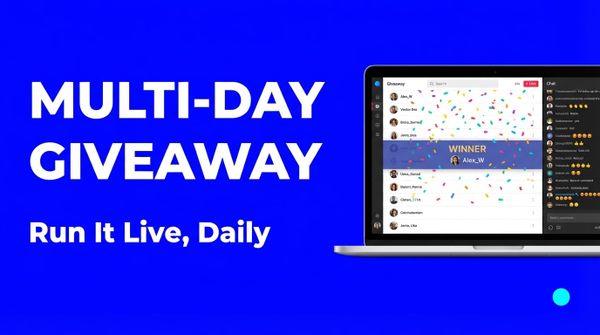
A giveaway over several days
One live stream a day, a draw in each, and a bigger prize on the last one.
Read the multi-day playbook
Set up your first live giveaway.
Frequently asked questions.
How do viewers enter a live giveaway?
They type your entry word in the live chat on YouTube, Facebook, Twitch or Instagram. Capital letters make no difference, and the word can sit inside a longer comment. A viewer has to be signed in to the platform to comment, and that comment is the entry.
Is a giveaway allowed on YouTube, Facebook, Twitch and Instagram?
Each platform says what it asks of a giveaway, and we read all four pages in September 2026. YouTube asks for official rules that link its Community Guidelines and carry a privacy notice, entry free of charge, and a statement that YouTube does not sponsor the giveaway and is not responsible for it. Facebook asks for official rules, a statement that Meta is not responsible for the giveaway and is not involved in it, and no entry by sharing, reposting or tagging. Instagram asks for official rules, the terms of who can enter, and a statement that Instagram is not responsible for the giveaway and is not associated with it. Twitch makes you the promoter, so the rules are yours to write, and asks you to show or read out that Twitch does not sponsor or endorse the giveaway. None of the four pages mentions entry by comment.
Can a viewer enter more than once?
No. Each viewer account is one entry, however many times it types the entry word.
How is the winner picked?
At random among the entries, when the timer ends or when you click Draw winner. For a second prize, draw again: a viewer who has already won is never picked twice.
Can I keep my team out of the draw?
Yes. Type their names in the Exclude users setting, separated by commas, and their comments do not count as entries.
How do I contact the winner?
Every winner is listed on the Broadcasts page in LiveReacting, with a link to their profile. On YouTube, which has no way to message a viewer, share the claim link: only the winning account can sign in on it and leave an email address.
Can I add a giveaway in the middle of my show, or run several?
Yes. Put the giveaway in a scene and switch to it when you are ready; entries count from the first time it is on air. For another round, reset the entries, and the earlier winners stay out of the draw. For separate giveaways, put one in each scene, and with a timer and a next scene chosen, the stream moves on by itself.
Can I run a giveaway without a host?
Yes. Put it over a pre-recorded video or a picture and set a timer. When the timer ends, the winner is drawn, and our servers send the stream, so your computer can be off. Two of the templates are built this way.
Can I use it with OBS, vMix or StreamYard?
Yes, with Plugin Mode, which adds the giveaway to your scene as a browser source. It is on some paid plans and not on the free one, and the pricing page lists which.
Is the giveaway on the free plan?
Yes. The giveaway is on every plan. The free plan streams to one channel at a time, for up to 30 minutes a stream, with the LiveReacting logo in the corner, and has no Plugin Mode. The pricing page lists what the other plans add.
Can you build a custom giveaway for me?
Yes. If the templates and the settings are not enough, our team builds a custom giveaway for an additional price. Ask through the Enterprise page.
How to run a giveaway in a live stream
- To run a giveaway in a live stream, sign up for LiveReacting and create a project from a giveaway template. Type your entry word, add the prize, and connect the YouTube, Facebook, Twitch or Instagram channel you stream to. Start the stream, and viewers enter by typing the word in the live chat; when the timer ends or you click Draw winner, the winner appears on the stream.
-
- Create a project from a giveaway template and type your entry word.
- Add the prize and connect the channel you stream to.
- Start the stream, and draw the winner in front of everyone.
-
 Written and reviewed by the LiveReacting Streaming Team. Powering live streams since 2016. See customer results.
Last updated: September 2026
Written and reviewed by the LiveReacting Streaming Team. Powering live streams since 2016. See customer results.
Last updated: September 2026
What you need to run a live giveaway
- One LiveReacting account You create the project and start the stream from your account. What each plan includes is on the pricing page. See pricing.
- A channel to stream to Sign in to your YouTube, Facebook, Twitch or Instagram channel from the project.
- An entry word and a prize A word of up to 11 characters that your viewers can type, and a picture of what they can win.
Give away your first prize live.
Pick a giveaway template, type your entry word and add a picture of the prize. The winner is drawn on the stream, in front of everyone who entered.
- No credit card
- 4.8 from 633 reviews
Want the numbers first? See pricing