Wordict, a Word Game for Your Live Stream.
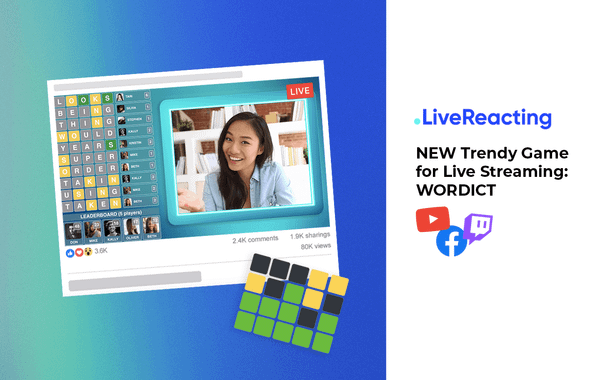
A guess-the-word game in the Wordle style, played in your live chat. Viewers type five-letter guesses on YouTube, Facebook, Twitch or Instagram. Then the board colors every letter of a guess, so the whole chat works the word out together.
- Free to start
- 4.8 from 633 reviews 4.8 is the average of 633 customer reviews. They come from public review sites and from our own review system.




- 2040Streams broadcasting through LiveReacting right now. Value updated every hour from the actual database. Streams live right now
- 3M+Every stream published through LiveReacting since launch. Counted in the LiveReacting database on 11 September 2026. Streams published
- 39K+ Customers
- 99.998% Uptime


Real words from the chat fill the board.
Green is the right letter in the right place, yellow is in the word but somewhere else, and grey is not in the word. The first viewer to guess the word solves it, and the next word starts.
-
Guesses from the chat
A five-letter word typed as the whole comment. It has to be a real English word or one of your own, and a word already on the board is skipped.
-
Points
2 for each green letter, 1 for each yellow, and 15 for the guess that solves the word.
-
The board and the leaderboard
The last 10 guesses, each with the guesser's first name, their picture when the platform sends one, and the points. Under it, the top 5 players and how many have played. Read how Wordict works.
634 viewers put a guess on the board in one live stream.
Word Dangal, a Wordict show on the Khel Video channel on YouTube, ran for three hours on February 22, 2026, and its viewers played through a list of 200 words in the live chat.
- Players
- 634
- Words in the game
- 200
- Hours on air
- 3
- Word Dangal shows
- 270
Counted from our records: this broadcast, and the Word Dangal shows from November 2025 to May 2026. A player is a YouTube account with at least one guess on the board.
Watch the live streamYour words, your screen, your rules on it.
Type the words yourself or generate them, then build the screen around the board from a template.

-
The words
From 1 to 200 five-letter words, typed or generated from our list. A themed list is yours to write, and your own words always count as guesses.
-
The screen around it
A template adds a countdown, a rules panel, your camera or a background. Each is a layer you can change.
-
The font
The typeface of the board, picked from the font list.
Run it with no host, or talk the chat through it.
Six seconds after a solve, the next word on your list starts by itself, until the list runs out. A word nobody solves stays on the board until someone does, or until you skip it.
Read the setup guide →-
Without a host
Over a background or a video, for up to 200 words. When the last word is solved, it stays on the board.
-
With you on camera
Talk the players through the board, and skip a word that nobody is getting.
-
Inside OBS, vMix or StreamYard
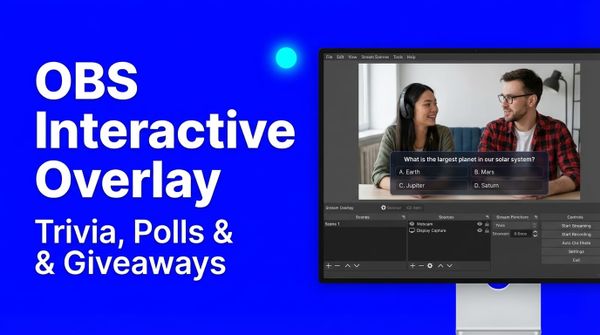
Plugin Mode gives the game a link for a browser source, so it sits over the video you send from there. Read the OBS guide.
3M+ live streams, 39K+ happy customers.
What they say about LiveReacting.

“The most amazing thing about this software is that you can update your stream on the fly. You can change branding, add pre-recorded videos and all from the cloud.
And then of course all the interactive tools like the countdowns, polls, trivia games are just so cool.”
 Geoffrey E.Chief Content Officer at a marketing agency
“LiveReacting is an amazing tool for interactive games on your live stream.
You can create all sorts of live games to play with your audience. It is really easy to set up and use.”
 Michael Feyrer Jr.Live Streaming Expert & YouTube Entrepreneur
“This software checks all the boxes of exactly what I need for my YouTube livestreaming.
The UI is fantastic and very easy to use. It seems other platforms all have one or a few features missing that ruin it, but LiveReacting has had everything I need.”
 Jesse E.YouTube content creator
“The different live stream formats LiveReacting provides have engaged our community with practical, intuitive, and fun trivia games & giveaways.
We plan to use these tools to expand our content creation even more in the future.”
 Luisa & MatLive Content Team at Hobbii
“Very satisfied with LiveReacting! It has helped us in social media campaigns and have contributed to successes of it.”
 Anne Nicole S.Social Media Officer at an airline
Start from a Wordict template.
A ready-made Wordict project. Open it, put in your words, and change the countdown or the rules to fit your show.
-
Open template
The board beside a panel that tells viewers how to play.
Wordict game with rules
-
 Open template
The board beside your camera, in a teal frame.
Wordict game with host
Open template
The board beside your camera, in a teal frame.
Wordict game with host
-
 Open template
A neon board and a countdown to the start of your show.
Wordict game with countdown
Open template
A neon board and a countdown to the start of your show.
Wordict game with countdown
-
 Open template
The board under a countdown and your show's name.
Wordict game with countdown 2
Open template
The board under a countdown and your show's name.
Wordict game with countdown 2
Where Wordict fits.
Six ways channels run it, each with a template, a page or a record to start from.
-
A daily word show
Hundreds of words over a few hours, the same time every day.
See Word Dangal -
A game night that lasts years
The Mother of All Nerds ran 1,067 Wordict games on its Facebook page and YouTube channel from 2022 to 2025.
See the templates -
Words on your theme
Knitting terms, team names or product words, typed in by you, so they always count.
Read the setup guide -
A countdown before the show
A few words to play while viewers arrive, beside the time left to the start.
See the countdown templates -
An English class
Five-letter vocabulary, with the colors showing students which letters they have right.
See interactive live streaming -
Beside a pre-recorded video
Your recorded show plays while the chat works through the words.
See pre-recorded live streaming
Learn Wordict in a few reads.
Frequently asked questions.
How do viewers play Wordict?
They type a five-letter word as a comment in the live chat on YouTube, Facebook, Twitch or Instagram. If it is a real English word or one of your words, it goes on the board with each letter colored: green in the right place, yellow in the word but somewhere else, grey not in the word. Capital letters make no difference.
How are points counted?
A guess scores 2 points for each green letter and 1 for each yellow. The guess that solves the word scores 15. Each viewer's points add up from word to word on the leaderboard.
How many guesses can viewers make?
As many as they like. The board shows the last 10 guesses, and when it is full, the oldest one drops off to make room.
Can I use my own words?
Yes. Type from 1 to 200 five-letter words, or generate them from our list and change the ones you want. Your own words always count as guesses, even when they are not in the English word list.
Can I play Wordict in another language?
The word list Wordict checks guesses against is English. The words you type yourself count as guesses in other languages too, and any other guess counts only if it is an English word. A few letters change when a comment is lowercased, such as the Turkish dotted I, and a word with one of them may not match.
Can I run Wordict without a host?
Yes. Put it over a background or a video, and six seconds after a solve, the next word on your list starts by itself, until the list runs out. A word nobody solves stays on the board, so give your viewers words they can get.
Can I use it with OBS, vMix or StreamYard?
Yes, with Plugin Mode, which adds the game to your scene as a browser source. It is on some paid plans and not on the free one, and the pricing page lists which.
Does Wordict pick a winner?
No. The leaderboard shows who has scored the most, and you announce the winner.
Is Wordict on the free plan?
Yes. Wordict is on every plan. The free plan streams to one channel at a time, for up to 30 minutes a stream, with the LiveReacting logo in the corner, and has no Plugin Mode. The pricing page lists what the other plans add.
Is Wordict the same as Wordle?
No. Wordle is a New York Times game that one person plays. Wordict is LiveReacting's game for a whole live chat, in the same guess-the-word style.
Can you build a custom game for me?
Describe the game you need through the Enterprise page. Our team reviews the requirements and gives you a quote before any work starts.
How to play a guess-the-word game with your live chat
- To play a guess-the-word game with your live chat, sign up for LiveReacting and create a project from a Wordict template, or add a Wordict layer to a project of your own. Add your five-letter words and sign in to the YouTube, Facebook, Twitch or Instagram channel you stream to. Start the stream, and viewers type their guesses in the live chat; the board colors each letter, and the leaderboard adds up the points.
-
- Create a project from a Wordict template, or add a Wordict layer to your own.
- Put in your words and connect your channel.
- Start the stream, and let the chat guess.
-
 Written and reviewed by the LiveReacting Streaming Team. Powering live streams since 2016. See customer results.
Last updated: September 2026
Written and reviewed by the LiveReacting Streaming Team. Powering live streams since 2016. See customer results.
Last updated: September 2026
What you need to run Wordict
- One LiveReacting account You create the project and start the stream from your account. What each plan includes is on the pricing page. See pricing.
- A channel with a live chat YouTube, Facebook, Twitch or Instagram, signed in from the project.
- Five-letter words Your own, or generated from our list, from 1 to 200 a game.
Put your first word on the board.
Choose a Wordict template, type your words and start the stream. The chat takes it from there.
- No credit card
- 4.8 from 633 reviews
Want the numbers first? See pricing